Polar Glow Ring
Layered waveform ribbons with bloom
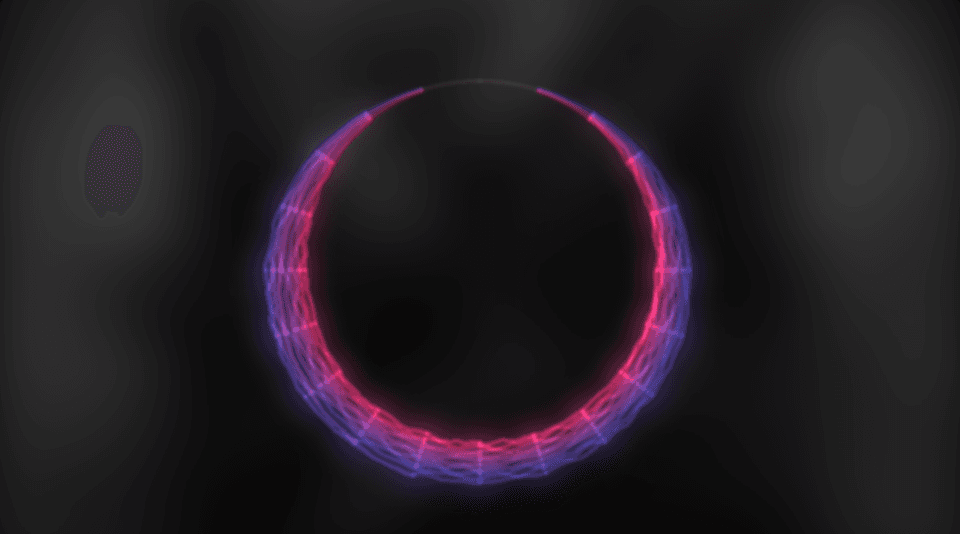
Concentric waveform strands taper toward an open gap at the top, layered with additive glow so the stack reads with depth. Moody, cinematic, and slow-burning.
- Cinematic
- Glow
- Ambient
- Moody
How Polar Glow Ring reacts
Several copies of the same ripple run around a circle at slightly different radii. The ripple comes from the waveform, so it follows the shape of the sound itself rather than a set of bars, and it is smoothed enough to move like a ribbon instead of a scribble. The copies are offset by a hair in phase, so they sway against each other and the stack looks layered.
At the top of the ring there is an opening. The ripple height, the spacing between contours and the brightness all taper to nothing there, so the lines converge toward the gap and fan out as they go round. It is that taper that makes the ring look like a single flowing object rather than a set of rings.
Colour runs from the inside out: the innermost contours take the warm end of the gradient and the outermost take the cold end, and heavy additive blur between them blends the two into a mid-tone where they overlap. With the default blue and rose gradient, that mid-tone is purple. The kick adds a small lift to the ripple height, and the whole ring drifts slowly around.
What it suits
- Ambient, cinematic, downtempo and post-rock, where slow, soft motion carries the track
- Vocal and singer-songwriter releases, since the line follows the voice in the waveform
- Title cards and intros with artist and track text centred inside the ring
- Late-night and mood playlists where bright flashing bars would feel wrong
Controls
Everything you can change on Polar Glow Ring, in the order it appears in the panel.
- Color mode
- Solid, a gradient from the cold outer contours to the warm inner ones, or colours taken from your cover art.
- Radius0.18-0.46, default 0.36
- How big the ring is, as a share of the shorter edge of the frame.
- Contour count2-10, default 6
- How many ripple lines are stacked.
- Contour spacing0.002-0.03, default 0.011
- The gap between neighbouring contours. Wider spacing separates the lines; tighter spacing fuses them into a band.
- Ripple height0.01-0.18, default 0.05
- How far the ripple moves in and out at full level.
- Ripple detail0.5-3, default 1.4
- How many times the waveform pattern repeats around the ring. Low values give a few broad swells; high values give a tighter ripple.
- Line weight0.5-6, default 1.6
- The thickness of the sharp line at the centre of each contour.
- Top opening0.02-0.6, default 0.22
- How wide the gap at the top of the ring is.
- Glow softness0-1, default 0.55
- How much the soft layer behind the lines is blurred. High values give a hazy bloom; low values keep it tight.
- Squash0.7-1, default 0.97
- How much the ring is flattened vertically. At 1 it is a perfect circle; lower values make it an ellipse.
- Drift speed-1 to 1, default 0.05
- A slow turn of the ripple around the ring. Negative values turn the other way.
- Glow / Reactivity / Smoothing0-2 / 0-2.5 / 0-1
- How strong the bloom is, overall sensitivity to the music, and how slowly the ripple follows the sound. Glow color can follow the contours or be set by hand.
Questions
Why is there a gap at the top?
It is the design: the contours converge to a point at the top and open out below it. Use Top opening to make the gap smaller or larger. It also leaves a natural place for a short line of text.
How do I get the warm inside and cold outside look?
Use Gradient as the Color mode. Gradient start sets the cold outer colour and Gradient end sets the warm inner colour. Raise Glow softness for a smoother blend in between.
It looks too smooth. Can I make it sharper?
Lower Glow softness and Smoothing, and raise Line weight. A higher Ripple detail also adds finer movement to each contour.
Does it use my cover art?
Only for colour, if you choose Auto theme. The ring itself does not show the artwork, so add it as an image layer in the middle if you want it on screen.
Guides for this style
How-tos that fit how people usually use this look — not a generic list.
Similar styles
Render Polar Glow Ring with your own track
Load a song, adjust the parameters live, and export up to 4K with no watermark.