Horizon Grid
Fly over a synthwave landscape your song builds
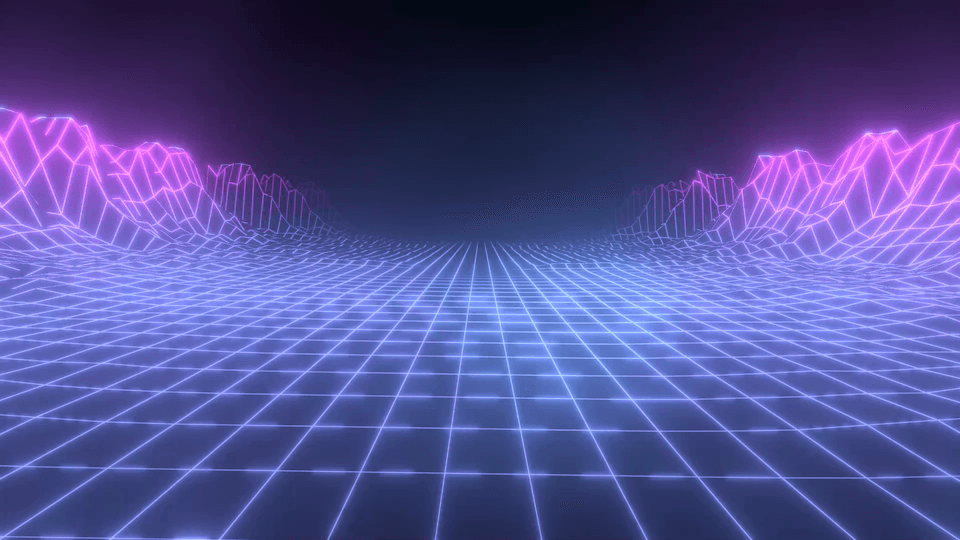
A glowing wireframe landscape in real 3D. The camera skims low over the ground while the music raises mountains at the horizon that fly toward you, and every kick lifts the whole range. Fog, bloom and hills that hide the lines behind them make it read as a world, not a pattern.
- 3D
- Synthwave
- Retro
- Camera
How Horizon Grid reacts
Every row of the ground is the spectrum at the moment that row was born on the horizon. Rows then travel toward the camera, so the shape of the music arrives as mountains you watch approaching. The kick lifts the whole range at once on top of that, so even the hills right in front of you bounce on the beat.
It is rendered in true 3D. Each hill hides the grid lines behind it, near lines are thick and far ones fine, and fog fades the landscape into the distance. The lines stay the same width in pixels at every resolution, so a 4K export is as crisp as the preview, and lines fade out before they crowd together at the horizon instead of smearing into a glare.
The camera sways gently as it flies, and a clear corridor is always kept in front of it, so it never flies into a peak. In vertical and square frames the landscape narrows to match, which keeps the mountains in view on a 9:16 Short instead of off to the sides.
What it suits
- Synthwave, retrowave, outrun and chillwave
- Lo-fi and electronic mixes where a long, steady flight suits the music
- Cover art as a sun: make the cover round and sit it on the horizon
- YouTube uploads at 1080p or 4K, and vertical Shorts and Reels
Controls
Everything you can change on Horizon Grid, in the order it appears in the panel.
- Color mode
- Solid, a gradient from the valley floor to the peaks, or colours from your cover art, brightened so the lines glow.
- Landscape
- Valley puts a flat road down the middle with mountains on both sides; Mountains raises one central range, bass in the middle; Spectrum runs the bass from the left.
- Flight speed0-3, default 1
- How fast the ground travels toward the camera. Zero freezes the landscape while it keeps reacting.
- Mountain height / Bass bounce0.1-2.5 / 0-1
- How tall the music builds the mountains, and how much the kick lifts the whole range.
- Roughness0-1, default 0.35
- A fixed craggy texture on every ridge, so peaks look like rock rather than smooth curves.
- Grid lines / Line width24-128 / 0.5-5
- How dense the grid is, and how thick its lines are in pixels at 1080p.
- Ground glow / View distance0-0.6 / 0.2-1
- A faint glow on the ground between the lines, and how far you can see before the fog takes over.
- Camera height / Look down / Field of view0.6-12 / -10° to 30° / 30°-100°
- Fly low for drama or high for an overview, angle the camera toward the ground, and widen or narrow the lens.
- Camera sway0-1, default 0.3
- A slow drift and roll as the camera flies. Zero holds it perfectly steady.
- Glow / Reactivity / Smoothing0-2.5 / 0-2.5 / 0-1
- Bloom on the lines, overall sensitivity to the music, and how smoothly the mountain shapes change.
Questions
Why is the ground flat when my song starts?
New mountains are born on the horizon and fly toward you, so the first few seconds show them arriving. That is part of the effect: by the time the intro builds, the range is in front of you.
How do I get the synthwave sun look?
Pick the Synthwave Sun preset, or in the Cover tab make the cover round and move it up so it sits on the horizon, where your artwork reads as the sun at the end of the valley.
Does it work for vertical videos?
Yes. The landscape narrows to fit 9:16 and 1:1 frames, so the mountains stay in view rather than falling off the sides.
Guides for this style
How-tos that fit how people usually use this look — not a generic list.
Similar styles

Render Horizon Grid with your own track
Load a song, adjust the parameters live, and export up to 4K with no watermark.