Plexus Network
A rotating 3D constellation
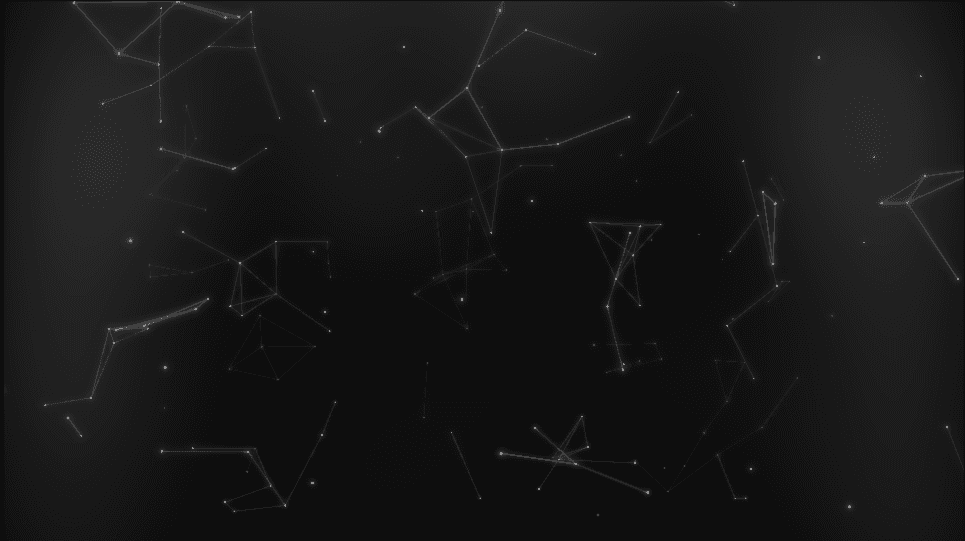
A point cloud drifting in front of a perspective camera, with lines drawn between near neighbours. Depth drives size, brightness and line weight, so the parallax reads as genuine 3D.
- 3D
- Tech
- Abstract
- Ambient
How Plexus Network reacts
The scene is a cloud of points floating in real 3D in front of a perspective camera. The cloud spins slowly and each point drifts on its own path, so the shape of the network is always changing even in a quiet passage. Points nearer the camera are bigger and brighter, and the lines between them are heavier, which is what makes the parallax read as depth.
Any two points that are close enough get a line between them. As points drift past each other, links appear and break, so the constellation keeps rewiring itself. The link distance decides how connected it looks: short distances give scattered clusters, long ones give a dense web.
Every point is tied to its own slice of the spectrum, scattered so neighbours do not all pulse together. A point swells when its frequencies are loud, and a loud one gets a halo; links between energetic points are drawn brighter. On a kick the whole cloud is also pushed outward and links reach a little further, then it settles back. The response is restrained, which is why the style suits ambient and tech tracks better than anything that needs a hard visual hit on every beat.
The network fills the whole canvas, so there is no disc for artwork. Put your title or logo on top as a layer.
What it suits
- Ambient, electronica, techno and IDM, where slow, steady motion suits the music
- Podcasts, talks and explainers about technology, data or networks
- Long-form uploads and study or focus mixes that need a calm background
- Backdrops for lyric or title text, since nothing is placed at the centre of the frame
Controls
Everything you can change on Plexus Network, in the order it appears in the panel.
- Color mode
- Solid, a gradient across the network, or colours taken from your cover art.
- Node count20-220, default 90
- How many points are in the cloud. More points make a richer web, but a denser, busier frame.
- Link distance0.05-0.4, default 0.18
- How close two points must be to get a line between them.
- Depth0.1-1.2, default 0.6
- How deep the cloud is. A deeper cloud has a stronger sense of parallax; a shallow one looks flatter.
- Spin speed-1 to 1, default 0.12
- How fast the whole cloud rotates. Negative values spin it the other way.
- Drift speed0-3, default 0.5
- How fast the points wander on their own. Zero keeps them fixed in the cloud.
- Node size0.5-10, default 3
- The size of each point at middle depth.
- Line weight0.3-4, default 1.1
- The thickness of the links.
- Bass push0-0.4, default 0.12
- How far a kick pushes the points outward.
- Node halo0-1, default 0.5
- The soft light around points whose frequencies are loud. Zero turns the halos off.
- Glow / Reactivity / Smoothing0-2 / 0-2.5 / 0-1
- Bloom on the network, overall sensitivity to the music, and how slowly it relaxes after a hit. Glow color can follow the network or be set by hand.
Questions
It barely reacts to my music. What do I raise?
Raise Bass push and Reactivity, and lower Smoothing. Plexus Network is deliberately subtle, so a track with a soft low end needs those pushed further than a club track does.
How do I get fewer lines?
Lower Link distance or Node count. Both cut down the number of connections, and Link distance does it without changing how many points are on screen.
Can I freeze the network and keep only the beat reaction?
Mostly. Set Spin speed and Drift speed to zero and the points stop wandering, so only their size, halos and the bass push move with the music. The camera still tilts very slightly over time.
Guides for this style
How-tos that fit how people usually use this look — not a generic list.
- How to make a Spotify Canvas~5 min
Short vertical loops that sit behind a song in Spotify.
- Exporting long DJ mixes and full albums~5 min
Multi-hour sets without running out of memory or guessing the render time.
- How to make a YouTube music visualizer video~6 min
16:9 layout, resolution choices, cover and titles, then a clean MP4 upload.
Similar styles
Render Plexus Network with your own track
Load a song, adjust the parameters live, and export up to 4K with no watermark.