Neon Peak Reflection
Gradient peaks over a mirrored pool
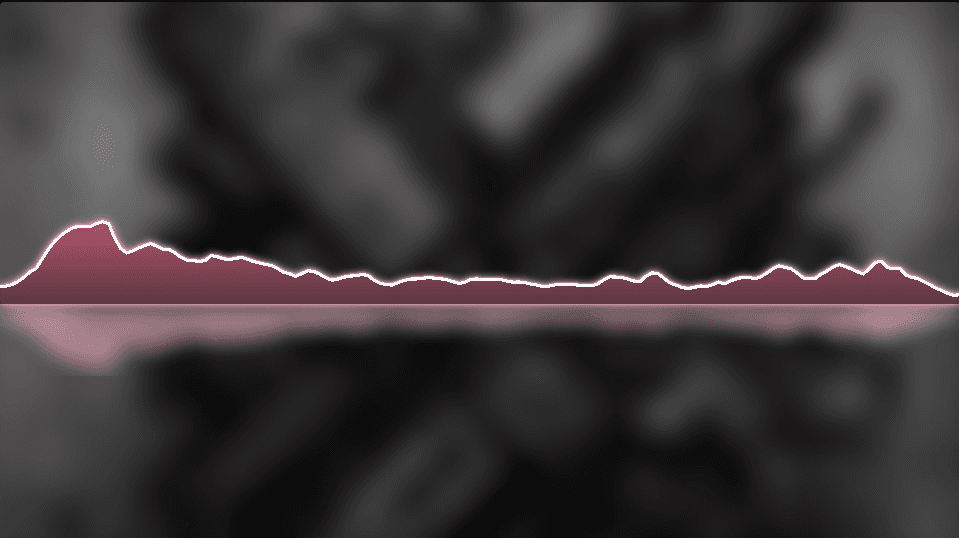
A solid gradient ridge line with light shafts rising from the peaks and a blurred reflection underneath. Dramatic, glossy, and built for release artwork.
- Gradient
- Reflection
- Release
- Glossy
How Neon Peak Reflection reacts
One ridge line follows the spectrum across the frame, filled with a gradient from the peaks down to the horizon. It is a single bold shape rather than a stack of lines, so it reads clearly even at thumbnail size. When the music hits, the ridge jumps up with it, and the fill follows.
Light shafts rise only from the strongest summits: a peak has to be a local high point and reach past half height before it gets a beam. A quiet passage shows none; a loud one lights up the sky above the biggest peaks, with taller peaks throwing taller, wider beams. Shaft height sets how far they reach.
Below the horizon is a reflection of the ridge, a little shorter than the original. Water blur softens it, from nearly sharp at zero to a heavy smear near the maximum. The glossy part of the look comes mainly from this reflection and the glow around the ridge line.
What it suits
- Release artwork and music videos for a single or an album, where the frame should look finished
- Electronic, pop and dance tracks that suit a bright gradient
- Videos with a title above the ridge, since the sky above it stays clear
- Short loops, where a big, simple shape works better than a lot of fine detail
Controls
Everything you can change on Neon Peak Reflection, in the order it appears in the panel.
- Color mode
- Solid, a gradient from the peak colour down to the base, or colours taken from your cover art.
- Peak height0.08-0.6, default 0.3
- How tall the ridge can grow at full level.
- Ridge detail20-160, default 70
- How many points make up the ridge. Lower looks bold and faceted; higher follows the spectrum closely.
- Peak layout
- Mountain range, Mirror (bass in center) or Left to right.
- Ridge line0-6, default 2
- The weight of the bright line along the top of the ridge. Zero leaves only the fill.
- Fill opacity0-1, default 0.75
- How solid the gradient fill under the ridge is.
- Light shafts0-1, default 0.55
- How bright the beams rising from the tallest peaks are. Zero turns them off.
- Shaft height0.2-1.5, default 0.8
- How far the beams reach up from their peaks.
- Reflection0-1, default 0.55
- How strong the mirrored copy below the horizon is.
- Water blur0-1, default 0.45
- How soft the reflection is, from a sharp mirror to a hazy smear.
- Width0.5-1, default 1
- How much of the frame's width the ridge covers.
- Horizon0.3-0.85, default 0.62
- Where the ridge sits from top to bottom, and so how much room there is for the reflection.
- Glow / Reactivity / Smoothing0-2 / 0-2.5 / 0-1
- Bloom around the ridge and shafts, overall sensitivity to the music, and how slowly the ridge falls after a hit. Glow color can follow the ridge or be set by hand.
Questions
Where should I put my title?
In the sky above the ridge. Lower Peak height and Shaft height so the tallest peaks and beams stay clear, or raise Horizon to move the whole scene down.
Can I remove the light shafts?
Yes. Set Light shafts to zero and you are left with the ridge and its reflection.
How do I get a sharper reflection?
Lower Water blur. At zero the reflection is nearly sharp, and raising it smears it out. Reflection itself sets how bright the mirrored copy is.
How is this different from Wireframe Terrain?
Wireframe Terrain builds a range out of many thin lines. Neon Peak Reflection is one solid filled ridge with light shafts and a blurred reflection, which gives it a glossier, more poster-like look.
Guides for this style
How-tos that fit how people usually use this look — not a generic list.
Similar styles

Render Neon Peak Reflection with your own track
Load a song, adjust the parameters live, and export up to 4K with no watermark.